01 / UPLOAD & ORGANIZEA home for every frame.
Drop in multiple photos at once. See your library in one place, then drag images into the order that tells your story.
A beautiful gallery is only the beginning. Behind it is your own control room—to upload, arrange, and manage your work without touching a line of code.
$599 to launch yours · A real, working photography platform.
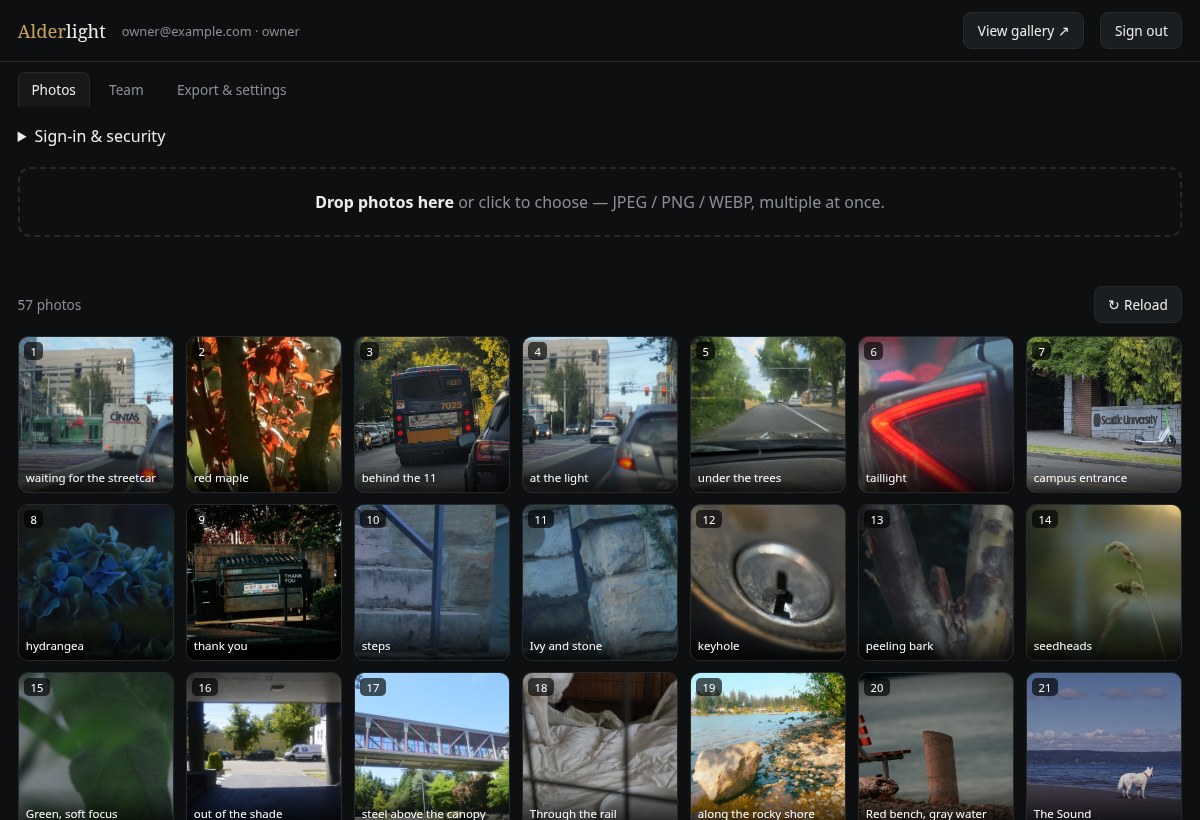
Real screens from the Alderlight admin panel. Click any preview for a closer look. Sample account details shown.Rather click around yourself? Open a private copy of the dashboard →
Drop in multiple photos at once. See your library in one place, then drag images into the order that tells your story.
Write titles and captions. Choose whether to show camera information, hide a frame, rotate it, or replace the image—all from your panel.
Give a collaborator their own sign-in. Owner and collaborator roles keep access separate, so helping with the gallery doesn’t mean sharing your login.
Your work goes with you.A gallery export brings your available image files and metadata together in a ZIP.
Sign in your way.Email-link access, with passkeys you can add for quick return visits.
One portfolio. Multiple stories.Organize different bodies of work into separate galleries, each with its own sequence and shareable link. Explore collections →
Coming to Alderlight 2.1. Running on the development install now, not yet switched on for client sites. Pricing is not set. Ask about early access below.
On upload, or whenever you ask, Assist proposes a title, a short caption and alt text for a photograph. Each one appears as editable text with Use and Dismiss. Use fills the field; your own Save changes stores it. The wording follows your existing titles, stays plain and literal, and never guesses places, names or species.
Suggest placement looks at a collection in its current order and proposes a spot for a new frame, with two alternatives. Each comes with reasons tied to its neighbors: how it follows the photo before and leads into the one after. Nothing moves unless you choose Place here, and no other photo is renumbered.
Card Culler is a prototype Nick runs on his own memory cards. It groups bursts, then offers a selection at three sizes, Best of, Highlights and Everything good, with a slider in between. Frames are ranked by how closely they fit the photographer’s own published galleries, not by a generic appeal score. Technical notes such as soft focus or bright highlights are advisory badges. Your picks always win.
One photographer’s test, October 2026: on a single card, the widest preset kept 10 of the 14 frames Nick had already chosen by hand. Not yet part of the Owner Panel.
Curation works at the scale of a gallery. The photographer sets the rules: neighbors never share a theme, a subject or a shoot date; recurring subjects are spread evenly across the run; the opener and closer are chosen on purpose. Every frame is tagged, a checker counts rule violations, and a search proposes an order that satisfies them. You review the proposal as a numbered contact sheet, then apply or discard it. Nothing reorders on its own, and the previous order is kept for undo.
In the lab: run on Nick’s own Field Record collection in October 2026, assisted and reviewed by hand. Not yet part of the Owner Panel.
Suggests, never applies.No suggestion is written to your site until you accept it, and nothing is ever deleted. The same rule covers Suggest edits, also in preview: up to three restrained adjustments with a before-and-after view, applied only when you say so, with the original file untouched and one-click revert.
Never ranks your work.Assist is told not to praise, score or judge a photograph, and a backstop removes judging words if any slip through. Culling flags explain; they do not decide.
What leaves your site.A suggestion sends a small copy of the photo, re-encoded without camera or location data, plus up to twelve of your existing titles for style. Placement sends small copies of the collection and its titles. Captions, notes, names and GPS stay home. The provider is the OpenAI API; inputs are not used for training and may be retained up to 30 days for abuse monitoring. A client site says so in its terms before Assist is switched on.
Nick uses AI-assisted development to explore and implement custom layouts, collection structures and owner workflows more quickly. Nick makes the design and technical decisions, reviews and tests the work, and takes responsibility for what is delivered.
Your included setup and any custom work are agreed before the build. Complex integrations, content preparation and testing affect the scope and schedule; rapid iteration is not a promise of instant delivery. Hosting, support and additional work are scoped separately.
I set up your photography website and its owner controls. You get a polished place to show your work—and a practical way to keep it fresh yourself.
Public gallery · Photo uploads · Drag-to-reorder · Photo editing · Owner access · Collaborator tools · Gallery export
to launch your Alderlight site
Let’s build yours →Includes your primary gallery. Additional galleries: $99 each.
Bring your photographs and a sense of how you want your work to feel online.
Your gallery and owner panel are set up together, ready for your work.
Sign in, upload, and curate. Your website can move at the same pace you do.